What is an MCP server?
+
A server your AI agent can call to get things done. FlowStudio's MCP server makes Power Automate operations (list flows, read a run, fix a failed action, deploy a flow) available as tools that ChatGPT, Claude, Copilot and other agents can use. MCP is short for Model Context Protocol, the standard those agents share.
Which AI agents are supported?
+
Any agent that supports MCP. ChatGPT and claude.ai add FlowStudio as a connector and sign in with a Microsoft work account. GitHub Copilot (native VS Code extension plus the official plugin and skills on awesome-copilot), Claude Code (native VS Code extension), Claude Desktop, OpenAI Codex and Copilot Studio use a FlowStudio key, and Copilot Cowork is added by a tenant admin from Microsoft Marketplace. If your agent can make HTTP calls with custom headers, it can use FlowStudio MCP.
Do I need to bring my own AI agent?
+
For FlowStudio MCP, yes. It is a server, not an agent, so you point an MCP-compatible agent you already have at it: ChatGPT, claude.ai, GitHub Copilot, Claude Code, Claude Desktop, OpenAI Codex, Copilot Studio, or Copilot Cowork. Not sure which one suits you? See which agent to use.
If you don’t have an agent and don’t want to set one up, FlowStudio AI brings its own. It fixes failed Power Automate flows and builds new ones in a browser chat, billed separately from your MCP plan.
How is this different from Microsoft’s own Power Automate MCP?
+
Microsoft’s FlowAgent is free, official, and runs on your own machine, signed in as you. It works from Claude Code and the GitHub Copilot command line, and it can list and trigger desktop flows, which we don’t. For one person automating their own work, it is often all you need.
The difference that matters is where access lives. FlowAgent has no key of its own: it borrows your sign-in on your laptop, so it reaches exactly what you reach and there is nowhere to attach a rule. FlowStudio MCP issues keys from the server, one per client or environment, each revocable on its own. Access is something you administer, not something tied to whoever is at the keyboard.
Being a service is also why other things can build on it. Any cloud agent, scheduled job or product can call it, and FlowStudio AI, the hosted Power Automate assistant, is built on it. You also get a cached inventory of every flow, maker and Power App with run analytics, plus tenant governance tools.
Plenty of teams run both: developers author flows with FlowAgent at the command line, and everyone else debugs and monitors through FlowStudio from wherever they work. Full side-by-side comparison.
Do I need a Power Automate Premium license?
+
FlowStudio MCP uses Microsoft's delegated access model. During setup you sign in with Microsoft and explicitly consent to two Power Platform scopes: flow management and activity reading. FlowStudio then calls Power Automate APIs on your behalf, limited strictly to the permissions you approved. You can revoke access from your dashboard at any time.
A Premium per-user license is not required to subscribe. However, if your flows use premium connectors (e.g. HTTP, Dataverse, SAP), those connectors still require appropriate Microsoft licensing in your tenant.
My organization blocks the Power Platform permission. Can I still use this?
+
Yes. Install the FlowStudio browser extension (add it to Chrome) and pair it with a browser key from your dashboard. Your agent’s calls then run inside the Power Automate session you are already signed in to, so there is nothing for an admin to approve and your Power Automate token never leaves your browser.
Signing in to mcp.flowstudio.app is a separate, basic Microsoft sign-in, and tenants that block the Power Platform permission usually still allow it, so you can reach your dashboard and create a key. The standard permission is the better route when you can use it: it is faster per call and works with your browser closed. Full steps in the browser key setup guide.
Do I need an API key, and how do I get one?
+
If you use ChatGPT or Claude, you do not handle a key: sign in through the connector and FlowStudio issues one to the agent. For every other agent, sign in at mcp.flowstudio.app, grant Power Platform permission on your dashboard, and copy the key from there. A new account starts on the free Starter plan. Pass it as an x-api-key header (not Bearer) to https://mcp.flowstudio.app/mcp.
What counts as an MCP call?
+
Each tools/call JSON-RPC request counts as one call. Discovery calls (tools/list) are free and don't count toward your quota.
Can people outside our tenant share one plan? Who pays?
+
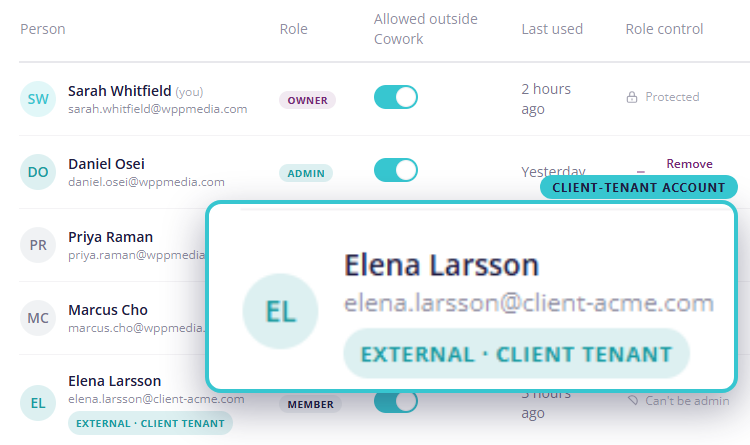
Yes. Team and Business pools can include Microsoft accounts from outside the tenant that bought the plan. That is how a consultancy covers the accounts its consultants use inside client tenants. The subscription is bought once, in the buying tenant, and client tenants are never billed.
What’s shared is the billing pool, not data. Each account sees only the environments and flows its own Microsoft sign-in can already access, so one client’s account never sees another client’s flows.
Do we need a Global Admin to buy a tenant plan?
+
No. Team and Business are bought on Microsoft Marketplace with a normal work account. A Microsoft 365 Global Admin only comes into it if you also add the Copilot Cowork plugin for your tenant. If you don’t use Cowork, no admin is involved.