Action-level visibility into Power Automate cloud flows for Copilot Studio, GitHub Copilot, Claude, and any MCP-compatible agent. Build, deploy, debug, and monitor flows programmatically, with run history and per-action inputs and outputs the Graph API does not expose.
100 free evaluation calls · No credit card required · Works with any MCP-compatible agent
Sign up with your Microsoft account, pick a plan, and grant FlowStudio permission to access Power Automate on your behalf. Or connect with a browser key instead, which runs calls in the Power Automate session you are already signed in to.
One-click install our VS Code extension for GitHub Copilot or Claude Code, or add the MCP config to your agent manually. Full walkthrough in the FlowStudio MCP setup guide.
"List my Power Automate flows": your agent calls the MCP tools and gets to work. See the full FlowStudio MCP tools reference.
MCP endpoint configuration
{
"mcpServers": {
"flowstudio": {
"url": "https://mcp.flowstudio.app/mcp",
"headers": {
"x-api-key": "<YOUR_JWT_TOKEN>"
}
}
}
}
One endpoint. Full lifecycle control. No browser, no UI, no manual steps.
Drill into nested scopes, trace per-action errors, apply fixes, and resubmit. The agent debugs what the portal can't show you.
ExampleDescribe what you need in plain English. The agent builds the flow JSON, wires connections, and deploys it live.
ExampleCheck failure rates, spot credential issues, and fix problems before users report them, across your entire flow estate.
ExampleBuilt with FlowStudio MCP
AI agents built every Power Automate flow in this open-source IT help desk through FlowStudio MCP: around 20 production flows (40+ with helpers), none hand-written.
A Copilot Studio agent that diagnoses and repairs failed Power Automate flows from Teams, with a human approving every fix. Built with FlowStudio MCP.
Every tool is accessible via a single MCP endpoint. Your agent discovers them automatically.
Full tools reference with descriptions › 15 live tools on every plan · 10 store tools on Pro+
| FlowStudio MCP | Power Automate Premium | M365 Copilot | |
|---|---|---|---|
| Run flows | ✓ | ✓ | ✓ |
| NL → flow generation | ✓ | – | ✓ |
| Programmatic flow API for agents | ✓ | – | – |
| Inspect run errors per action | ✓ | – | – |
| Deploy from AI agent | ✓ | – | – |
| Multi-environment support | ✓ | – | – |
| Price | Free + from $29/mo | $15/user/mo | $30/user/mo |
Try FlowStudio MCP with 100 evaluation calls. When you’re building regularly, move to Pro or Pro+ for bigger monthly limits and advanced ops. FlowStudio Pro and Teams subscribers get 100 calls/month included.
100 evaluation calls · 21 days
No credit card required. Upgrade anytime.
For makers & developers
IT teams & governance
Need more? Contact us for Enterprise pricing with unlimited calls, SLA, and dedicated support.
Calls reset monthly on paid plans. Unused calls don’t roll over.
Free Evaluation includes 100 calls total to use within 21 days.
Power Automate licensing still applies (e.g., premium connectors and tenant policies).
If your tenant locks down consent, you can still connect with a browser key, which runs calls in your own signed-in Power Automate session.
Buying for a whole tenant or a consultancy? See tenant plans ›
One FlowStudio MCP pool for your whole tenant. Everyone draws from the same calls, so a heavy week for one maker never means buying anyone a bigger plan, and nothing unused is thrown away at month end. You choose who connects, and whether they work inside Copilot Cowork only or from any agent they sign in to.
A call is one thing your agent does: list your flows, read a run, pull an action’s inputs and outputs, push a fix. Your dashboard shows what your tenant used last month, so you can size a pool against your own numbers.
Auto-provisioned in Copilot Cowork
Three makers on Pro+ cost $297. This pool is $149.
Launch price until 1 Oct 2026. Choose annual billing to hold this rate for a full year.
✗Four makers at 1,200 calls each on Pro+: $396 a month.
✓One shared Team pool: $149 a month.
Completed on Microsoft Marketplace with a normal work account.
Send this to your admin ›
Same as Team. Three times the calls.
✓Not sure yet? Start on Team. Overage keeps your calls working, and your invoice tells you when to move up.
Completed on Microsoft Marketplace with a normal work account.
Send this to your admin ›
Team and Business are billed and managed by Microsoft. Prices in US dollars.
For Power Platform consultancies
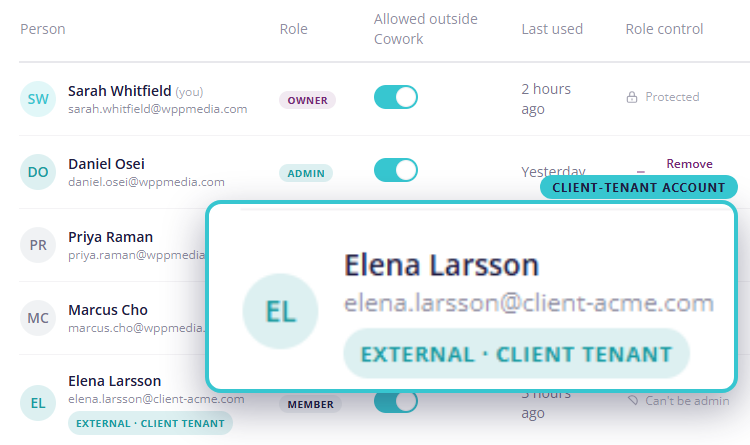
One Team plan—$149 a month, bought once in your own tenant. Pool 5,000 MCP calls each month across unlimited people, including accounts from outside your own tenant.
Bought on Microsoft Marketplace with your own work account. Client tenants are never billed. Compare Team and Business
Want to try first? Start free with 100 evaluation calls—no credit card, no purchase.
Share one allowance
Everyone draws from the same monthly pool. It resets monthly, and unused calls do not roll over.
Include client accounts
Add the Microsoft accounts your consultants use in client tenants. Each account connects from its own tenant while drawing from the shared pool. What’s shared is the billing pool, not data—each account sees only what its own sign-in can already access.
Control each member
For every member, including client-tenant accounts, choose Copilot Cowork only or any MCP agent they sign in to.
Need more calls? Business raises the shared pool to 15,000 calls a month with the same access and administration features.
Works with Copilot, Claude, and any MCP-compatible agent. Install our skills and your AI assistant knows how to use every FlowStudio MCP tool.
One-click install. MCP server + plugin in under a minute.
Install from VS Code MarketplaceOne-click install. All 5 skills + MCP connection in under a minute. Works in VS Code, terminal, and Claude Desktop.
No install. A tenant admin adds FlowStudio MCP from Microsoft Marketplace, then everyone uses it inside Cowork by asking in plain English.
The VS Code extension is a one-time configurator, not a runtime broker. It writes the MCP server entry to ~/.claude.json and skills to ~/.claude/skills/. The connection then works in Claude Code via VS Code, terminal, and Claude Desktop because all three read from the same directory.
Pair the FlowStudio browser extension with a browser key from your dashboard. Your agent’s calls run inside the Power Automate session you are already signed in to, so your Power Automate token never leaves your browser and your agent can reach only what you can reach. Nothing new is granted, so there is nothing for an admin to approve. It works with any of the agents above.
Common cases: your tenant locks down consent, or you sign in to several client tenants.
The standard Power Platform permission is the better route when you can use it. It is faster per call and works with your browser closed.
Edge users: our Edge Add-ons listing is in review — until then, open the Chrome Web Store link in Edge and allow extensions from other stores.
Core connection and operation: list, read, trigger, cancel flows
Step-by-step diagnostics for failing flows with error tracing
Scaffold & deploy flow definitions from scratch
Opt flows in for monitoring, track failures, configure alerts
Tag flows, set owners, business impact & compliance metadata
Full MCP plugin: bundles all 5 skills for GitHub Copilot
Your credentials never touch our server. We use Microsoft’s OAuth 2.0 delegated access, scoped to Power Platform only.
Microsoft Sign-in
Your org or personal account
Grant Consent
Power Platform scopes: flows and activity only
JWT Token
Per-user key, revocable anytime
MCP Calls
Agent sends x-api-key header
The browser extension is the alternative to Grant Consent. FlowStudio hands each call to the extension, which runs it inside your signed-in Power Automate session, so your Power Automate token never leaves your browser and no new permission is granted to us. How browser keys work
Never read your mailbox or calendar
We have no Mail, Calendar, or personal-data scopes. Zero access.
Never store flow definitions (Starter & Pro)
On Starter and Pro tiers every call goes direct to the Power Automate API. We don’t cache or persist your flow data.
Never share data with third parties
Your data stays between you, Microsoft, and FlowStudio. No analytics partners, no reselling.
Never retain credentials
Microsoft OAuth tokens are used for delegated calls only. Your API key can be revoked from the dashboard at any time.
Pro+ tier store tools provide run statistics and governance data for monitored flows. Security · Privacy · Responsible AI · Terms
MCP (Model Context Protocol) is a JSON-RPC 2.0 protocol that lets AI agents discover and call tools on a remote server. FlowStudio implements an MCP server that exposes Power Automate operations as tools your AI agent can call.
Any agent that supports the MCP protocol, including GitHub Copilot (native VS Code extension + official plugin & skills), Claude Code (native VS Code extension), Copilot Studio, and custom agents. If your agent can make HTTP calls with custom headers, it can use FlowStudio MCP.
For FlowStudio MCP, yes. It is a server, not an agent, so you point an MCP-compatible agent you already have at it: GitHub Copilot, Claude Code, Claude Desktop, Copilot Studio, or Copilot Cowork. Not sure which one suits you? See which agent to use.
If you don’t have an agent and don’t want to set one up, FlowStudio AI brings its own. It is a chat assistant for Power Automate that runs in your browser, billed separately from your MCP plan.
Microsoft’s FlowAgent is free, official, and runs on your own machine, signed in as you. It works from Claude Code and the GitHub Copilot command line, and it can list and trigger desktop flows, which we don’t. For one person automating their own work, it is often all you need.
The difference that matters is where access lives. FlowAgent has no key of its own: it borrows your sign-in on your laptop, so it reaches exactly what you reach and there is nowhere to attach a rule. FlowStudio MCP issues keys from the server, one per client or environment, each revocable on its own. Access is something you administer, not something tied to whoever is at the keyboard.
Being a service is also why other things can build on it. Any cloud agent, scheduled job or product can call it, and FlowStudio AI is built on it. You also get a cached inventory of every flow, maker and Power App with run analytics, plus tenant governance tools.
Plenty of teams run both: developers author flows with FlowAgent at the command line, and everyone else debugs and monitors through FlowStudio from wherever they work. Full side-by-side comparison.
FlowStudio MCP uses Microsoft's delegated access model. During setup you sign in with Microsoft and explicitly consent to two Power Platform scopes: flow management and activity reading. FlowStudio then calls Power Automate APIs on your behalf, limited strictly to the permissions you approved. You can revoke access from your dashboard at any time.
A Premium per-user license is not required to subscribe. However, if your flows use premium connectors (e.g. HTTP, Dataverse, SAP), those connectors still require appropriate Microsoft licensing in your tenant.
Yes. Install the FlowStudio browser extension — add it to Chrome — and pair it with a browser key from your dashboard. Your agent’s calls then run inside the Power Automate session you are already signed in to, so there is nothing for an admin to approve and your Power Automate token never leaves your browser.
Signing in to mcp.flowstudio.app is a separate, basic Microsoft sign-in, and tenants that block the Power Platform permission usually still allow it, so you can reach your dashboard and create a key. The standard permission is the better route when you can use it: it is faster per call and works with your browser closed. Full steps in the browser key setup guide.
Sign in with your Microsoft account, subscribe to a plan, and grant Power Platform permission on your dashboard. Your API key is then available immediately. Pass it as an x-api-key header (not Bearer) to the MCP endpoint.
Each tools/call JSON-RPC request counts as one call. Discovery calls (tools/list) are free and don't count toward your quota.
Yes. Team and Business pools can include Microsoft accounts from outside the tenant that bought the plan—that is how a consultancy covers the accounts its consultants use inside client tenants. The subscription is bought once, in the buying tenant, and client tenants are never billed.
What’s shared is the billing pool, not data. Each account sees only the environments and flows its own Microsoft sign-in can already access, so one client’s account never sees another client’s flows.
No. Team and Business are bought on Microsoft Marketplace with a normal work account. A Microsoft 365 Global Admin only comes into it if you also add the Copilot Cowork plugin for your tenant—if you don’t use Cowork, no admin is involved.
Talk to the team behind FlowStudio MCP. We'll get you connected, debug a stubborn flow, or launch your first AI agent end-to-end. No slideware.
A quick walkthrough for current subscribers. Get your server connected, debug a tool call, or sanity-check your first flow.
A guided 1-hour session to launch your first AI agent with FlowStudio MCP. We set up the server, wire in a Power Automate flow, and walk you through debugging end-to-end.
Flexible hourly support for FlowStudio MCP in your stack. Covers agent integration, flow debugging, and custom tool configuration across Power Automate, Power Apps, and Power BI.
Also need help beyond MCP? FlowStudio Consulting & Support covers Power Automate, Power Apps, Power BI, and SharePoint.
Your FlowStudio subscription includes 100 MCP calls/month. Sign in to claim your bundle and connect your AI agent.
Sign in & claim bundleAlready on MCP Pro or Pro+? Just sign in.